Goals
Goals record what a patient is working toward. You will find them at Patient record → Care Plan → Goals.
Goals belong to the patient, not to a session, so this list and the one in every session's Goal Setting step are the same list. They work for any patient, whether or not the family has an app.
Adding a goal
Click Add Goal and fill in:
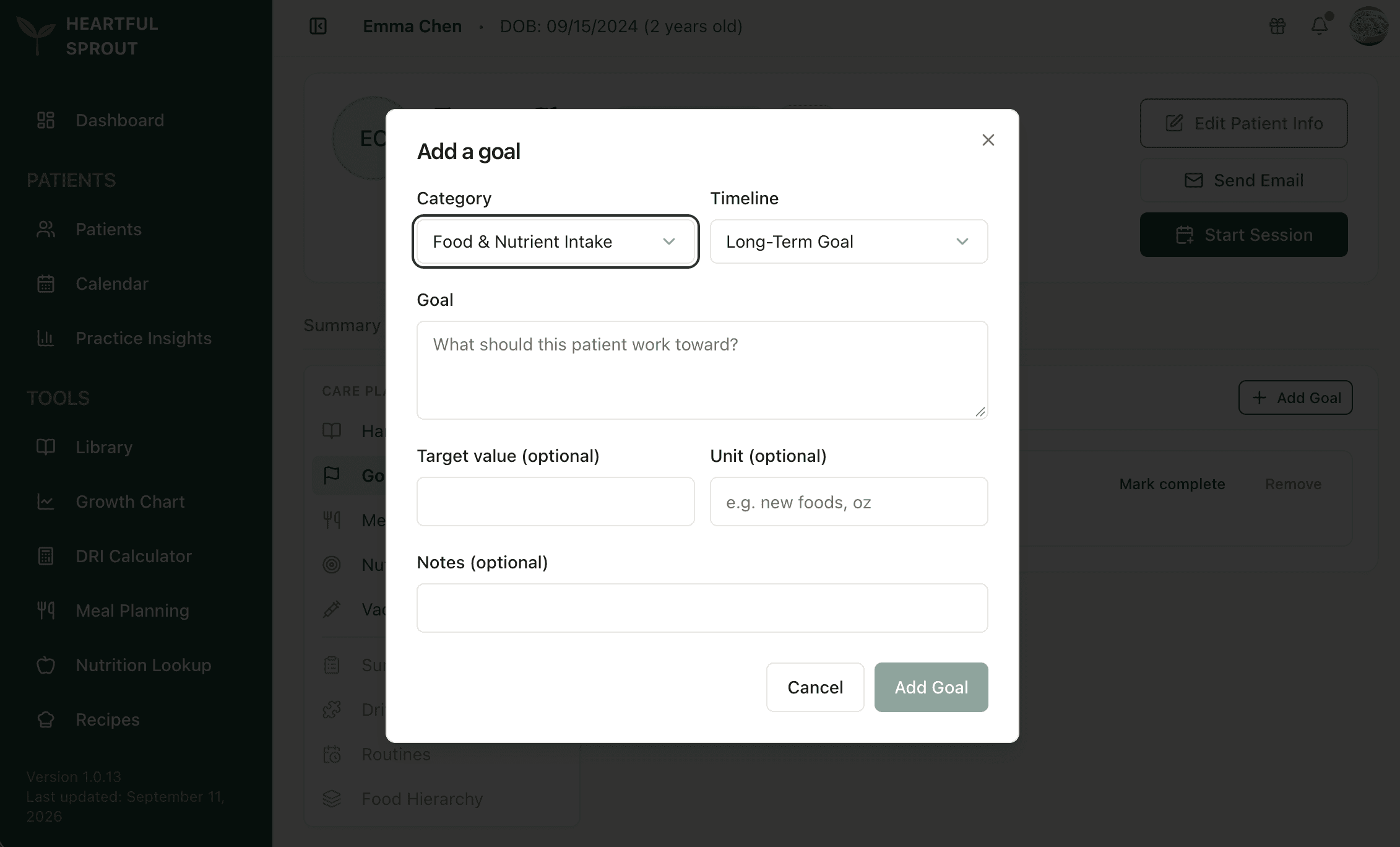
| Field | Notes |
|---|---|
| Category | Food & Nutrient Intake · Mealtime Behavior · Feeding Skills · Growth & Weight · Medical & Clinical · Education · Other |
| Timeline | How far out the goal sits, for example Long-Term Goal |
| Goal | The description itself, required. Short, actionable, family-readable, since a connected family sees it in their app |
| Target value and Unit | Optional, for measurable goals, e.g. 3 / new foods |
| Notes | Optional |
Goals save immediately. There is no separate save step.
Keeping goals current
- Mark complete when the patient gets there. It moves to Completed Goals and keeps the date.
- Reactivate a completed goal if the work resumes.
- Remove a goal at any time.
Viewers can read goals but not change them.
Active goals print on the Session Summary PDF, and a connected family sees them in their app, so write each one as something a parent can act on.