Which app should I invite my patient to?
Each program you turn on maps to one patient app: Nutrition guidance to Heartful Sprout, Infant tracking to Heartful Baby, and Eating recovery to Eating Recovery. You can turn on more than one, though most families do best starting with a single app.
Choosing by presentation
| The family's situation | Turn on |
|---|---|
| Newborn, not yet on solids | Infant tracking |
| Around 6 months, starting solids | Nutrition guidance |
| Toddler or older, nutrition counseling | Nutrition guidance |
| Preterm infant with NICU follow-up | Infant tracking |
| ARFID, picky eating, restrictive patterns | Eating recovery |
| Feeding difficulty in an infant | Infant tracking + Eating recovery |
How the apps differ
 Heartful Sprout Heartful Sprout |  Heartful Baby Heartful Baby |  Eating Recovery Eating Recovery | |
|---|---|---|---|
| Primary focus | Nutrition counseling & meal planning | Daily tracking & clinical depth | Home practice for feeding difficulty |
| Best age range | 6 mo – toddler+ | Newborn – toddler | Any age |
| What it tracks | Meals, reactions, growth | Feeds, sleep, diapers, growth, milestones, vaccines | Exposures, food log, check-ins, screeners |
Full feature detail sits on each app's page: Heartful Sprout, Heartful Baby, Eating Recovery.
What each app feeds back
Whichever you choose, this is the part that matters clinically: which records fill in on your side.
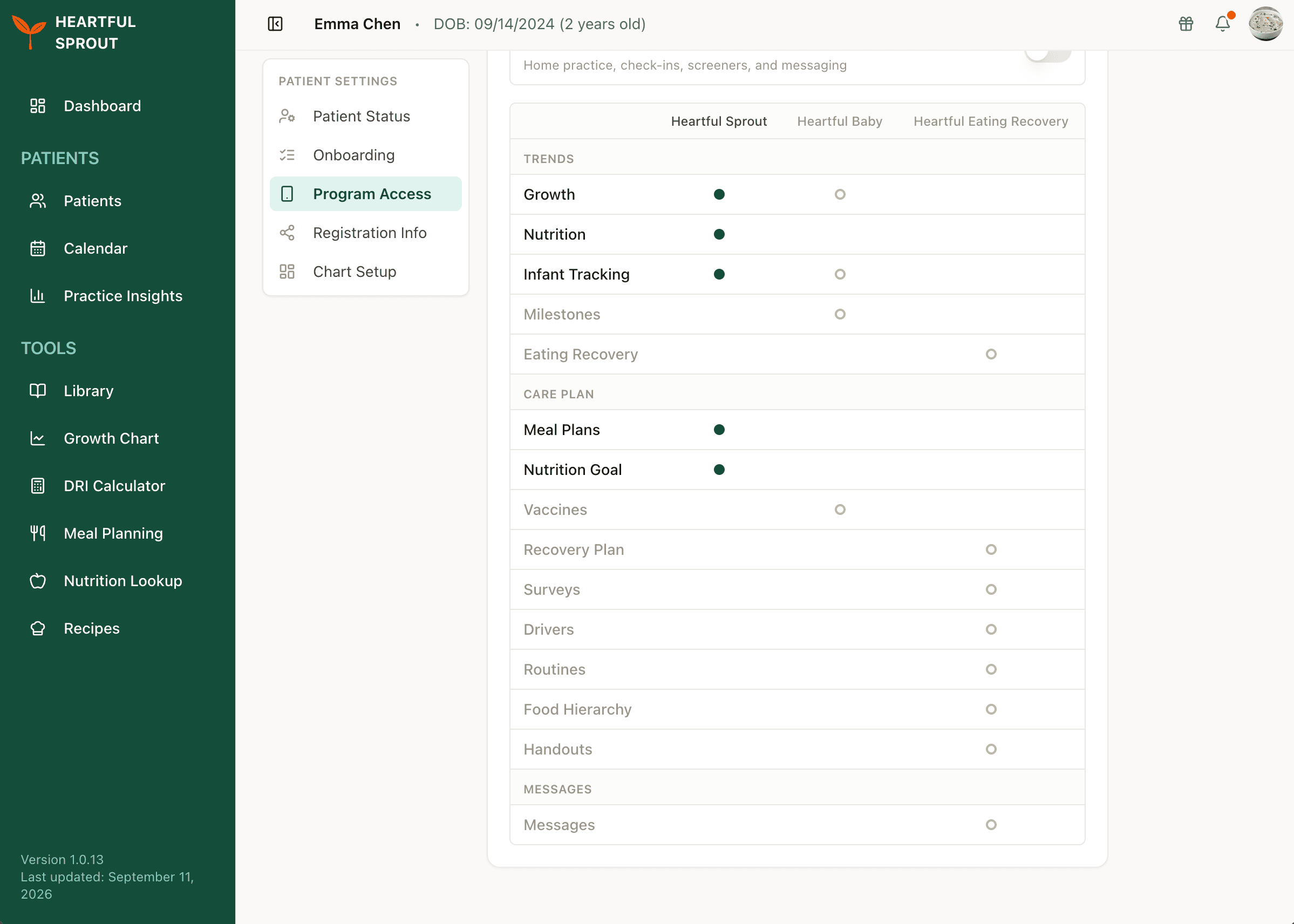
A filled dot means the family is on that app and the record is receiving data. A hollow dot means that app would feed the record, but it is not turned on for them. You can check this per patient from Manage access.
Changing programs later
Programs can be added or removed at any time from the patient's Program Access panel. See Manage access. The family keeps the same invite code, and data already logged is retained when a program is turned off.
Where a family is borderline, start with one. Adherence to a single app is more useful than partial use of two.