Nutrition Goal
A nutrition goal is the set of targets a patient's intake is measured against. Until you set one, the platform uses calculated USDA values; once you set one, your numbers govern.
Where to set it
Two routes reach the same goal:
- From Trends → Nutrition, click Set nutrition goal, or Update nutrition goal if one already exists.
- Inside a session, at Step 4, Nutrition Guidance, where setting targets is part of the visit.
Use the Trends route when you are adjusting between visits, and the session route when the change belongs to a visit you are documenting.
What the dialog does
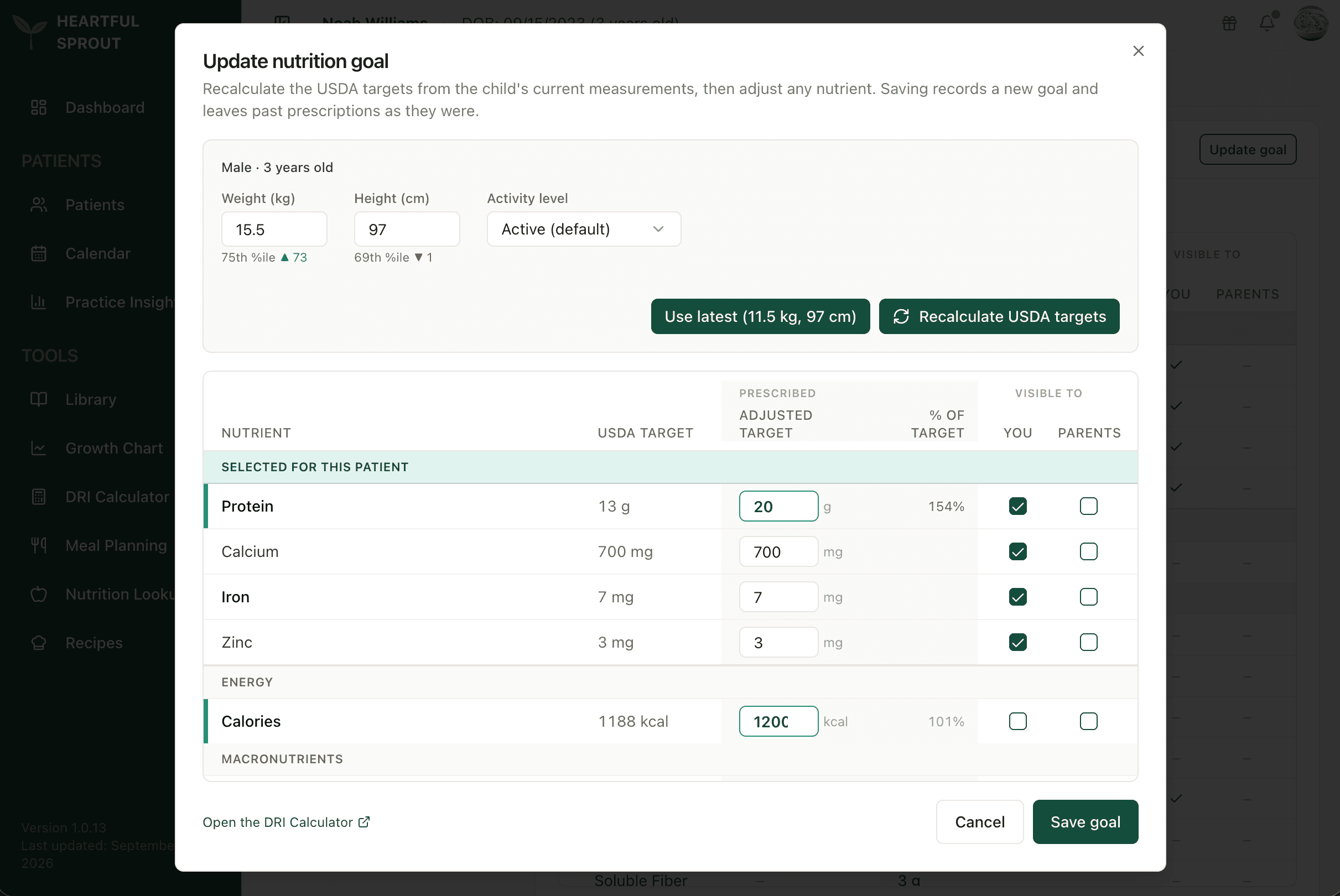
The top block holds weight, height, and activity level. Use latest pulls the newest measurements from the record, and Recalculate USDA targets refreshes the calculated column from them.
Below, one row per nutrient: the USDA target, your adjusted target, and the adjusted figure as a % of target, so an override reads at a glance (20 g against a calculated 13 g shows 154%). Nutrients you have ticked collect at the top under Selected for this patient; the rest sit in their groups below.
Two Visible to checkboxes sit on every row and do different jobs:
| Checkbox | Effect |
|---|---|
| You | Makes the nutrient a priority nutrient, which puts it on the radar chart in Trends → Nutrition |
| Parents | Surfaces that nutrient in the family's own app |
Those are independent. A nutrient you are watching closely is not automatically something the family sees, which matters when tracking something you do not want a parent anxiously counting.
Saving
Saving records a new goal and leaves previous prescriptions untouched, so the history of what you prescribed stays intact rather than being overwritten.
Open the DRI Calculator at the foot of the dialog jumps to the standalone tool for a scratch calculation.
Once priority nutrients are set, the radar chart narrows to those, with calories always kept as the first axis. See Which nutrients are shown.